Obervability
Services
AudiTrace
Resources▾
Contact
Book a free audit
Audit domain · 7 checks
Dynatrace audit log review: who changed what, and when
Seven checks on the tenant’s own audit log — configuration changes by actor, changes made outside business hours, deletions of monitoring configuration, and activity from tokens rather than people.
Book a free audit
All 71 checks
What these checks read
Change volume by actor
Who is changing configuration, how often, and whether the top actors are people, service accounts or automation.
Out-of-hours configuration changes
Changes made outside working hours, by actor. Not a violation in itself — a question worth being able to answer.
Deletions
Deleted alerting profiles, management zones, dashboards and monitoring settings, with the actor and timestamp for each.
Token-driven activity
Changes made by API tokens, mapped back to the token and its owner where the token still exists.
Why it matters
Most tenants have never read their own audit log. It is there, it is retained, and nothing routes it anywhere, so the first time anyone opens it is during an incident review — which is the worst moment to discover that the change that caused the outage was made by a token whose owner left last year.
This domain is deliberately descriptive rather than prescriptive. It produces the shape of change in your tenant: who, what, when, and through which credential. Where that shape is surprising — a service account making settings changes at 03:00, a burst of deletions on one afternoon — the finding hands you the rows and lets you decide whether it was routine.
It also underpins every other domain. When the FinOps checks find a bucket at 462 days of retention, the audit log is what answers the next question: nobody chose it, or somebody did, on a date, for a reason that may still apply.
Questions we get about this domain
How far back can the audit look?
As far as your tenant retains its audit log — typically the last 90 days on Grail-backed tenants, less on older configurations. The report states the window it actually read rather than implying a longer one.
Is reading the audit log itself logged?
Yes, and that is the point: the audit runs under a named token you issue and revoke, so every read it performs is attributable to you in your own log. Nothing about the audit is invisible to the tenant owner.
The other audit domains
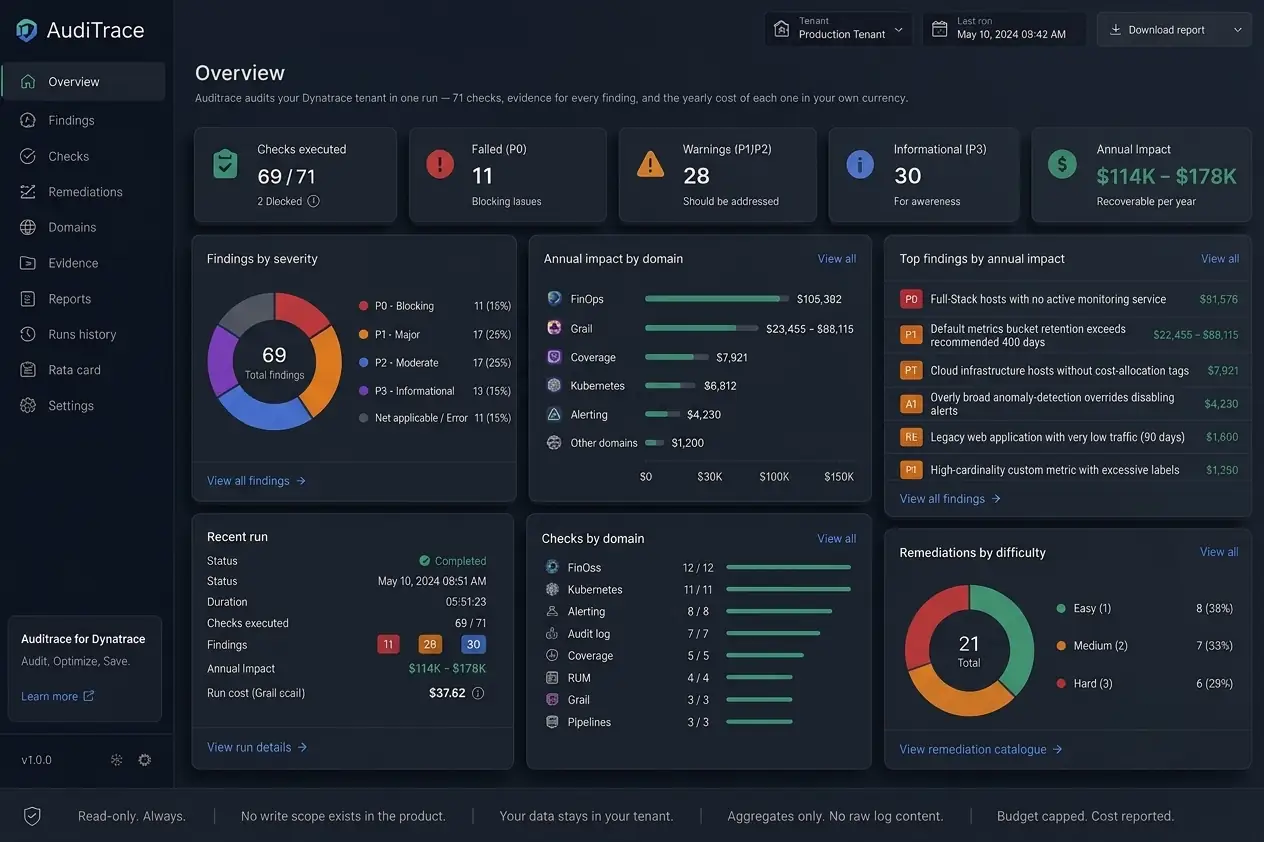
Nineteen domains, 71 checks, one read-only run. Each domain is a page.
FinOps
Where the money goes, and what is recoverable
Kubernetes
Cluster coverage, versions, recurring failures
Alerting
Whether an incident would actually reach a human
Audit log
Who changed what, when, and outside business hours
Coverage
What is monitored, what only looks monitored
RUM
Real-user monitoring reach and privacy settings
Grail
Buckets, retention, annualized storage cost
Pipelines
Ingest processing, masking, drop rules
Synthetic
Synthetic monitors that pass, fail, or never run
Topology
Entity detection quality and entity explosion
OpenTelemetry
OTel sources and dual instrumentation
Security
Token scopes, expiry, dormant credentials
Workflows
Automation that fails or never fires
Bizevents
Business event provider hygiene
Dashboards
Dashboard inventory
Davis
Root-cause attribution rate
OpenPipeline
Route and pipeline resolution
SLO
SLO definitions that break on re-detection
Tagging
Environment tagging convention
See what this domain finds on your own tenant.
One read-only run covers all nineteen domains. You keep the report either way.
Book a free audit
See how AudiTrace works
Find out what your Obervability is actually doing.
An audit takes one run. The findings take one meeting. What you do with them is up to you.
Certified Dynatrace experts
+1
Obervability
Dynatrace implementation, managed services and support. Every finding comes with the source behind it.
Services
Services
AudiTrace
Case study
Guides
Dynatrace audit
Dynatrace cost optimization
Audit case study
Articles
Reach us
Contact
hello@obzervability.com
© 2026 Obervability · All rights reserved.
Privacy
Terms of use
Accessibility
Obervability
{{ t.navServices }}
AudiTrace
{{ resLabel }}▾
{{ t.navContact }}
{{ footGuideAudit }}
{{ footGuideCost }}
{{ footGuideCase }}
{{ footGuideArticles }}
{{ langLabel }} ▾
English
{{ altLabel }}
{{ t.heroKicker }}
{{ t.heroTitle }}
{{ t.heroSub }}
{{ t.heroCta1 }}
{{ t.heroCta2 }}
{{ t.badge }}
71
{{ t.stripChecks }}
19
{{ t.stripDomains }}
21
{{ t.stripRem }}
0
{{ t.stripWrite }}
{{ t.svcTitle }}
{{ t.s1t }}
{{ t.s1d }}
{{ t.s2t }}
{{ t.s2d }}
{{ t.s3t }}
{{ t.s3d }}
{{ t.caseKicker }}
{{ t.caseTitle }}
{{ t.caseCtx }}
{{ t.caseNote }}
{{ t.svcKick }}
{{ t.svcTitle2 }}
{{ t.svcSub }}
{{ t.heroCta1 }}
{{ t.svcCta2 }}
71
{{ t.svcL1 }}
$114–178k
{{ t.svcL2 }}
0
{{ t.svcL3 }}
{{ t.svcTracksT }}
{{ t.svcTracksD }}
{{ k.t }}
{{ k.g }}
{{ k.d }}
{{ t.fcTitle }}
{{ t.svcFindD }}
{{ f.t }}
{{ f.d }}
{{ t.svcEngT }}
{{ t.colEng }}
{{ t.colTrack }}
{{ t.colShape }}
{{ e.n }}
{{ e.k }}
{{ e.s }}
{{ t.svcCtaT }}
{{ t.svcCtaD }}
{{ g.kicker }}
{{ g.title }}
{{ g.sub }}
{{ g.cta1 }}
{{ g.cta2 }}
{{ g.s1h }}
{{ p.t }}
{{ g.s2h }}
{{ g.s2sub }}
{{ c.t }}
{{ c.d }}
{{ g.s3h }}
{{ g.s3sub }}
{{ g.s4h }}
{{ g.s4sub }}
{{ g.tableNote }}
{{ g.s5h }}
{{ g.s5sub }}
{{ k.t }}
{{ k.d }}
{{ g.s6h }}
{{ c.t }}
{{ c.d }}
{{ g.faqH }}
{{ f.q }}
{{ f.a }}
{{ g.closerT }}
{{ g.closerD }}
{{ g.cta1 }}
{{ g.closerCta }}
{{ g.kicker }}
{{ g.title }}
{{ g.sub }}
{{ g.cta1 }}
{{ g.cta2 }}
{{ g.s1h }}
{{ p.t }}
{{ g.s2h }}
{{ g.s2sub }}
{{ g.tableNote }}
{{ g.s3h }}
{{ c.t }}
{{ c.d }}
{{ g.s4h }}
{{ c.t }}
{{ c.d }}
{{ g.faqH }}
{{ f.q }}
{{ f.a }}
{{ g.closerT }}
{{ g.closerD }}
{{ g.cta1 }}
{{ g.closerCta }}
{{ dom.kicker }}
{{ dom.title }}
{{ dom.lede }}
{{ dom.ctaBook }}
{{ dom.ctaChecks }}
{{ dom.hReads }}
{{ r.t }}
{{ r.d }}
{{ dom.hWhy }}
{{ p.t }}
{{ dom.findLabel }}
{{ dom.findName }}
{{ dom.lblScale }}
{{ dom.findScale }}
{{ dom.lblImpact }}
{{ dom.findImpact }}
{{ dom.findNote }}
{{ dom.hFaqs }}
{{ f.q }}
{{ f.a }}
{{ dom.hOther }}
{{ dom.otherSub }}
{{ dom.closerT }}
{{ dom.closerD }}
{{ dom.ctaBook }}
{{ dom.closerCta }}
{{ c.kicker }}
{{ c.title }}
{{ c.sub }}
{{ c.cta1 }}
{{ c.cta2 }}
{{ f.n }}
{{ f.l }}
{{ c.s1h }}
{{ c.s1sub }}
{{ c.tableNote }}
{{ c.s2h }}
{{ p.t }}
{{ c.s3h }}
{{ a.t }}
{{ a.d }}
{{ c.s4h }}
{{ f.q }}
{{ f.a }}
{{ c.closerT }}
{{ c.closerD }}
{{ c.cta1 }}
{{ c.closerCta }}
{{ art.kicker }}
{{ art.title }}
{{ art.dek }}
{{ art.dateLine }}
{{ s.h }}
{{ p.t }}
DQL
{{ s.code }}
{{ art.findLabel }}
{{ art.findName }}
{{ art.scaleLabel }}
{{ art.findScale }}
{{ art.impactLabel }}
{{ art.findImpact }}
{{ art.takeawayLabel }}
{{ art.takeaway }}
{{ art.moreLabel }}
{{ art.ctaTitle }}
{{ art.ctaSub }}
{{ art.ctaBtn }}
AudiTrace
{{ artIndexKicker }}
{{ artIndexTitle }}
{{ artIndexSub }}
{{ t.privTitle }}
{{ t.privUpdated }}
{{ s.h }}
{{ s.b }}
{{ t.termsTitle }}
{{ t.termsUpdated }}
{{ s.h }}
{{ s.b }}
{{ t.a11yTitle }}
{{ t.a11yUpdated }}
{{ s.h }}
{{ s.b }}
{{ c.t }}
{{ c.d }}
{{ t.pTitle }}
{{ p.t }}
{{ p.d }}
{{ p.fig }}
{{ t.hTitle }}
{{ s.n }}
{{ s.t }}
{{ s.d }}
{{ t.way1k }}
{{ t.way1t }}
{{ t.way1d }}
{{ t.way2k }}
{{ t.way2t }}
{{ t.way2d }}
{{ t.waysNote }}
{{ t.fcTitle }}
{{ i.t }}
{{ i.d }}
{{ t.prDelTitle }}
{{ d.t }}
{{ d.d }}
{{ t.dTitle }}
{{ t.dSub }}
{{ t.secTitle }}
{{ b.t }}
{{ b.d }}
{{ n.t }}
{{ t.oTitle }}
{{ o.k }}
{{ o.t }}
{{ o.d }}
{{ o.p }}
{{ t.faqTitle }}
{{ q.q }}
{{ q.a }}
{{ t.cTitle }}
{{ t.cSub }}
{{ t.badge }}
{{ t.fSentT }}
{{ t.fSentD }}
{{ ccDial }}
{{ formErrMsg }}
{{ t.footColServices }}
{{ t.navServices }}
AudiTrace
{{ t.navCase }}
{{ t.footColGuides }}
{{ footGuideAudit }}
{{ footGuideCost }}
{{ footGuideCase }}
{{ footGuideArticles }}
{{ t.footColReach }}
{{ t.navContact }}
hello@obzervability.com
© 2026 Obzervability · {{ t.footRights }}
{{ t.navPrivacy }}
{{ t.navTerms }}
{{ t.navA11y }}