Obervability
Services
AudiTrace
Ressources▾
Contact
FR ▾
Réserver un audit gratuit
Déclaration d’accessibilité
Dernière révision le 15 septembre 2026
Note sur la langue
Cette déclaration d’accessibilité est publiée en anglais, et la version anglaise ci-dessous est celle qui fait foi. Pour signaler un obstacle en français, écrivez à accessibility@obzervability.com.
1. Our commitment
1.1. Obervability wants this site to be usable by everyone, including people who browse with a screen reader, with a keyboard alone, with speech input, or with a magnifier.
1.2. The site was built to conform to WCAG 2.1 level AA, the level Israeli Standard 5568 points at, and to the Equal Rights for Persons with Disabilities (Accessibility Adjustments to a Service) Regulations, 5773–2013.
1.3. Accessibility is not a one-off exercise here. Every change to the site is checked against the same standard before it ships.
2. What has been done
A visible focus indicator on every interactive element, so a keyboard user can always see where they are.
Full keyboard operation: everything that can be clicked can be reached with Tab and activated with Enter or Space, and announces itself as a control.
A skip-to-content link as the first stop in the tab order.
Semantic headings — one h1 per page and a real heading hierarchy beneath it — rather than text that is merely large.
Text and background colours checked against the 4.5:1 contrast ratio AA requires for body text.
A declared page language and reading direction on every page, including the right-to-left Hebrew edition.
Descriptive labels on form fields, with errors reported in text rather than by colour alone.
Decorative graphics hidden from assistive technology, so a screen reader is not read a list of ornaments.
Layouts that reflow to a single column on a narrow screen and survive being zoomed to 200%.
3. The accessibility menu
3.1. The button at the bottom of every page opens a menu of display preferences: four text sizes, high contrast, grayscale, underlined links, a readable font, wider line spacing, stopped animations and a large cursor.
3.2. Your choices are remembered in your own browser and are never sent to us. Clearing your browser data clears them.
3.3. The menu supplements the browser's own accessibility features; it does not replace them, and the site is built to work with them.
4. Known limitations
4.1. Parts of the site render after JavaScript loads. Every page is also served as complete HTML before that happens, so content is available to assistive technology either way, but a browser with JavaScript disabled will not show the accessibility menu itself.
4.2. Content hosted by third parties — for example a document opened on an external service — is outside our control and may not meet the same standard.
4.3. If you meet a barrier that is not listed here, we would like to know. It is the fastest way for it to get fixed.
5. Accessibility feedback and the responsible person
If something on this site is not accessible to you, write to us and say what you were trying to do and what got in the way. We treat accessibility reports as faults, not feature requests.
Email: accessibility@obzervability.com
General contact: hello@obzervability.com
Responsible for accessibility: Miki Itin
We aim to respond within two business days.
6. Status of this statement
This statement was last reviewed on 15 September 2026 and describes the site as it stands on that date. It is updated whenever the site changes in a way that affects accessibility.
Découvrez ce que votre Obervability fait réellement.
Un audit prend une exécution. Les constats prennent une réunion. Ce que vous en faites vous appartient.
Experts Dynatrace certifiés
+1
Obervability
Implémentation, services managés et support Dynatrace. Chaque constat arrive avec la source qui le sous-tend.
Services
Services
AudiTrace
Étude de cas
Guides
Audit Dynatrace
Optimisation des coûts Dynatrace
Étude de cas
Articles
Nous joindre
Contact
hello@obzervability.com
© 2026 Obervability · Tous droits réservés.
Confidentialité
Conditions d’utilisation
Accessibilité
Obervability
{{ t.navServices }}
AudiTrace
{{ resLabel }}▾
{{ t.navContact }}
{{ footGuideAudit }}
{{ footGuideCost }}
{{ footGuideCase }}
{{ footGuideArticles }}
{{ langLabel }} ▾
English
{{ altLabel }}
{{ t.heroKicker }}
{{ t.heroTitle }}
{{ t.heroSub }}
{{ t.heroCta1 }}
{{ t.heroCta2 }}
{{ t.badge }}
71
{{ t.stripChecks }}
19
{{ t.stripDomains }}
21
{{ t.stripRem }}
0
{{ t.stripWrite }}
{{ t.svcTitle }}
{{ t.s1t }}
{{ t.s1d }}
{{ t.s2t }}
{{ t.s2d }}
{{ t.s3t }}
{{ t.s3d }}
{{ t.caseKicker }}
{{ t.caseTitle }}
{{ t.caseCtx }}
{{ t.caseNote }}
{{ t.svcKick }}
{{ t.svcTitle2 }}
{{ t.svcSub }}
{{ t.heroCta1 }}
{{ t.svcCta2 }}
71
{{ t.svcL1 }}
$114–178k
{{ t.svcL2 }}
0
{{ t.svcL3 }}
{{ t.svcTracksT }}
{{ t.svcTracksD }}
{{ k.t }}
{{ k.g }}
{{ k.d }}
{{ t.fcTitle }}
{{ t.svcFindD }}
{{ f.t }}
{{ f.d }}
{{ t.svcEngT }}
{{ t.colEng }}
{{ t.colTrack }}
{{ t.colShape }}
{{ e.n }}
{{ e.k }}
{{ e.s }}
{{ t.svcCtaT }}
{{ t.svcCtaD }}
{{ g.kicker }}
{{ g.title }}
{{ g.sub }}
{{ g.cta1 }}
{{ g.cta2 }}
{{ g.s1h }}
{{ p.t }}
{{ g.s2h }}
{{ g.s2sub }}
{{ c.t }}
{{ c.d }}
{{ g.s3h }}
{{ g.s3sub }}
{{ g.s4h }}
{{ g.s4sub }}
{{ g.tableNote }}
{{ g.s5h }}
{{ g.s5sub }}
{{ k.t }}
{{ k.d }}
{{ g.s6h }}
{{ c.t }}
{{ c.d }}
{{ g.faqH }}
{{ f.q }}
{{ f.a }}
{{ g.closerT }}
{{ g.closerD }}
{{ g.cta1 }}
{{ g.closerCta }}
{{ g.kicker }}
{{ g.title }}
{{ g.sub }}
{{ g.cta1 }}
{{ g.cta2 }}
{{ g.s1h }}
{{ p.t }}
{{ g.s2h }}
{{ g.s2sub }}
{{ g.tableNote }}
{{ g.s3h }}
{{ c.t }}
{{ c.d }}
{{ g.s4h }}
{{ c.t }}
{{ c.d }}
{{ g.faqH }}
{{ f.q }}
{{ f.a }}
{{ g.closerT }}
{{ g.closerD }}
{{ g.cta1 }}
{{ g.closerCta }}
{{ dom.kicker }}
{{ dom.title }}
{{ dom.lede }}
{{ dom.ctaBook }}
{{ dom.ctaChecks }}
{{ dom.hReads }}
{{ r.t }}
{{ r.d }}
{{ dom.hWhy }}
{{ p.t }}
{{ dom.findLabel }}
{{ dom.findName }}
{{ dom.lblScale }}
{{ dom.findScale }}
{{ dom.lblImpact }}
{{ dom.findImpact }}
{{ dom.findNote }}
{{ dom.hFaqs }}
{{ f.q }}
{{ f.a }}
{{ dom.hOther }}
{{ dom.otherSub }}
{{ dom.closerT }}
{{ dom.closerD }}
{{ dom.ctaBook }}
{{ dom.closerCta }}
{{ c.kicker }}
{{ c.title }}
{{ c.sub }}
{{ c.cta1 }}
{{ c.cta2 }}
{{ f.n }}
{{ f.l }}
{{ c.s1h }}
{{ c.s1sub }}
{{ c.tableNote }}
{{ c.s2h }}
{{ p.t }}
{{ c.s3h }}
{{ a.t }}
{{ a.d }}
{{ c.s4h }}
{{ f.q }}
{{ f.a }}
{{ c.closerT }}
{{ c.closerD }}
{{ c.cta1 }}
{{ c.closerCta }}
{{ art.kicker }}
{{ art.title }}
{{ art.dek }}
{{ art.dateLine }}
{{ s.h }}
{{ p.t }}
DQL
{{ s.code }}
{{ art.findLabel }}
{{ art.findName }}
{{ art.scaleLabel }}
{{ art.findScale }}
{{ art.impactLabel }}
{{ art.findImpact }}
{{ art.takeawayLabel }}
{{ art.takeaway }}
{{ art.moreLabel }}
{{ art.ctaTitle }}
{{ art.ctaSub }}
{{ art.ctaBtn }}
AudiTrace
{{ artIndexKicker }}
{{ artIndexTitle }}
{{ artIndexSub }}
{{ t.privTitle }}
{{ t.privUpdated }}
{{ s.h }}
{{ s.b }}
{{ t.termsTitle }}
{{ t.termsUpdated }}
{{ s.h }}
{{ s.b }}
{{ t.a11yTitle }}
{{ t.a11yUpdated }}
{{ s.h }}
{{ s.b }}
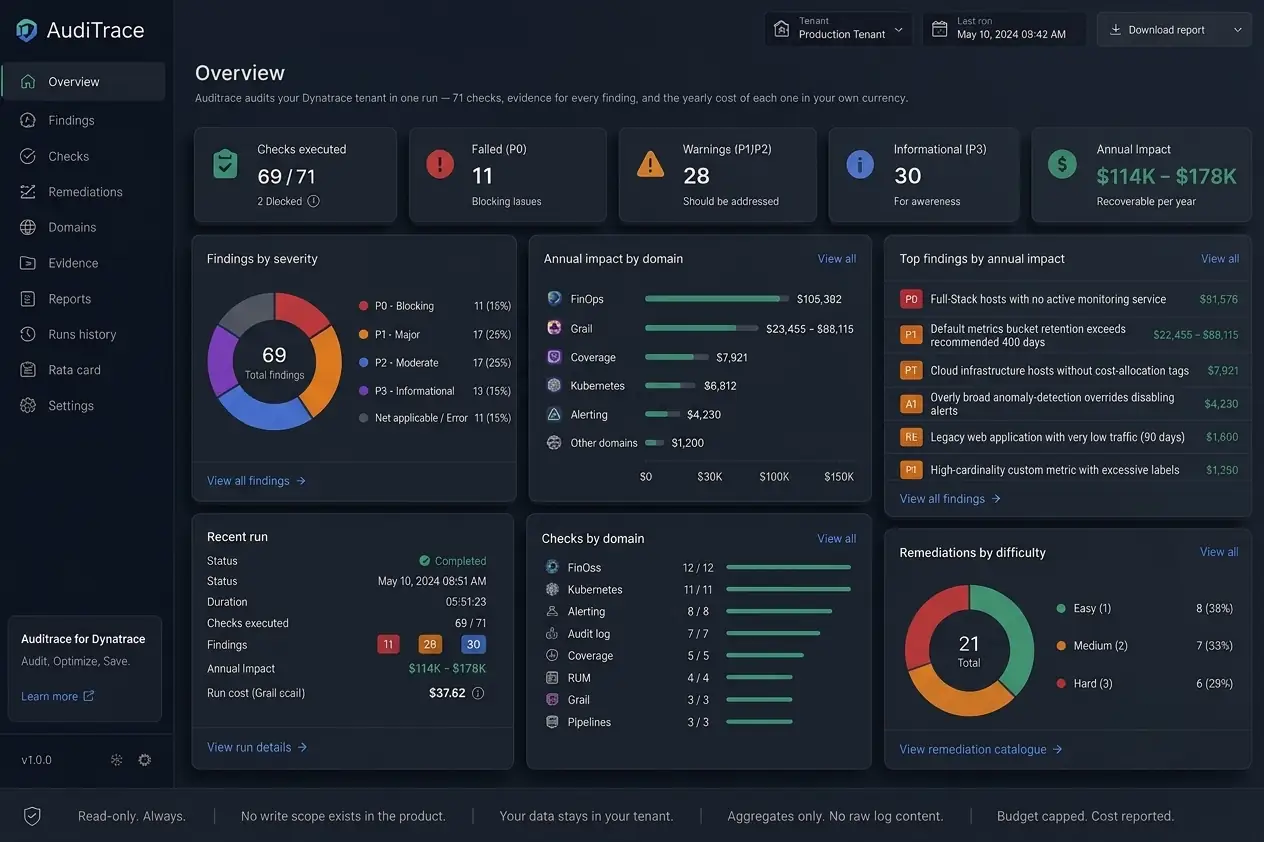
{{ c.t }}
{{ c.d }}
{{ t.pTitle }}
{{ p.t }}
{{ p.d }}
{{ p.fig }}
{{ t.hTitle }}
{{ s.n }}
{{ s.t }}
{{ s.d }}
{{ t.way1k }}
{{ t.way1t }}
{{ t.way1d }}
{{ t.way2k }}
{{ t.way2t }}
{{ t.way2d }}
{{ t.waysNote }}
{{ t.fcTitle }}
{{ i.t }}
{{ i.d }}
{{ t.prDelTitle }}
{{ d.t }}
{{ d.d }}
{{ t.dTitle }}
{{ t.dSub }}
{{ t.secTitle }}
{{ b.t }}
{{ b.d }}
{{ n.t }}
{{ t.oTitle }}
{{ o.k }}
{{ o.t }}
{{ o.d }}
{{ o.p }}
{{ t.faqTitle }}
{{ q.q }}
{{ q.a }}
{{ t.cTitle }}
{{ t.cSub }}
{{ t.badge }}
{{ t.fSentT }}
{{ t.fSentD }}
{{ ccDial }}
{{ formErrMsg }}
{{ t.footColServices }}
{{ t.navServices }}
AudiTrace
{{ t.navCase }}
{{ t.footColGuides }}
{{ footGuideAudit }}
{{ footGuideCost }}
{{ footGuideCase }}
{{ footGuideArticles }}
{{ t.footColReach }}
{{ t.navContact }}
hello@obzervability.com
© 2026 Obzervability · {{ t.footRights }}
{{ t.navPrivacy }}
{{ t.navTerms }}
{{ t.navA11y }}